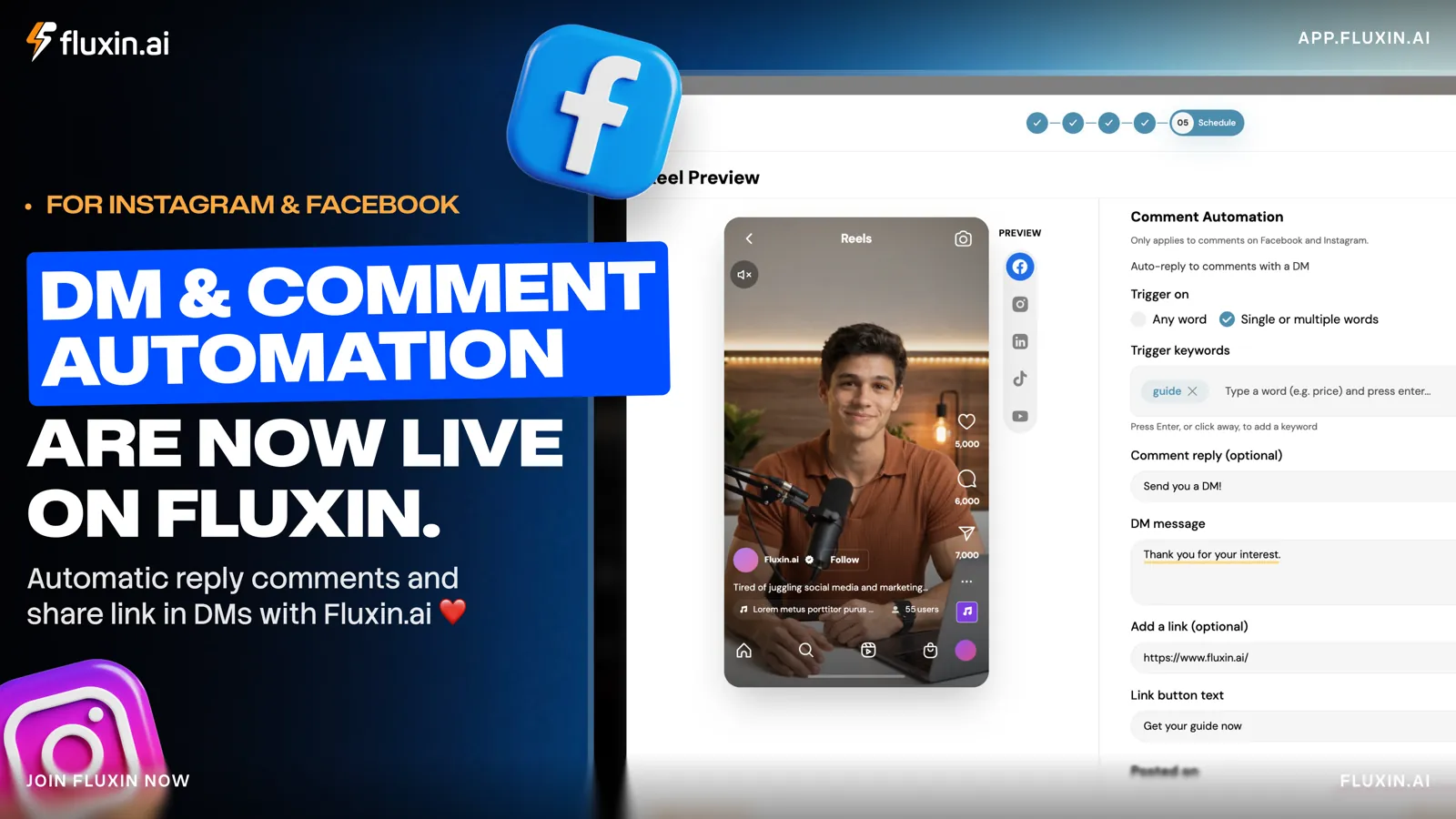
Ask people to comment a keyword on your post and they receive your link in their DMs straight away. Somebody comments "GUIDE", Fluxin.ai replies under their comment, and the guide lands in their inbox moments later. You do not have to type a word, and you do not need to be online. It is live now on Facebook and Instagram.
If you post to promote something, you already know how it goes. The comments fill up with "Link?" and "How much?". Every one of those is a warm lead, and every one of them is waiting on you.
Why do comments turn into lost customers?
Because the reply arrives too late. Somebody who comments is interested at that exact moment. If your answer comes six hours later, they have scrolled on, forgotten about it, or bought from whoever answered first.
Most small teams cannot watch their comments all day. Pasting the same link into thirty separate DMs is slow work, and it is very easy to miss somebody entirely.
What is comment-to-DM automation?
You choose the words that trigger it, write a short public reply and a private message, and add your link. When somebody comments one of those words on your Facebook or Instagram post, Fluxin.ai replies to their comment and sends them a DM containing the link.
It works on Facebook and Instagram only, because the private reply it sends relies on Meta's API and the other networks have no equivalent. It also applies to ordinary posts rather than ads. The automation sits inside the same flow you already use to create and schedule content, so there is no second tool to learn.
How do you set it up?
- Create your Reel in Fluxin.ai as you normally would.
- Set up the automation at the Schedule step, step 5 for a standard Reel or feed post. Save the post first, then turn on comment automation and fill in the fields below.
- Schedule it. Pick your publish time. The automation is already running by the time the post goes live.
What each field at step 5 does:
| Field | What it does | Example |
|---|---|---|
| Auto-reply to comments with a DM | The main switch. Turn it on to activate the automation | On |
| Trigger on | "Any word" messages everyone who comments. "Single or multiple words" messages only the people who use your keywords | Single or multiple words |
| Trigger keywords | The words that start the automation. Type a word and press Enter to add it, as many as you like | GUIDE, PRICE |
| Comment reply (optional) | A short public reply under the person's comment, so everyone else sees you respond | "Thanks! Sent you a DM!" |
| DM message | The private message the person receives | "Thanks for commenting! Here is what you asked for." |
| Add a link (optional) | The link sent with the DM | Your guide, price list or booking page |
| Link button text (optional) | The label on the button that carries your link. Leave it blank to use the default | Get your guide now |
Click Save when you have finished.
What happens when someone comments?
Four things, in order, and three of them happen without you.
- You publish the post. Keywords set, reply and DM written, link attached.
- Somebody comments your keyword. Your post asks people to comment "GUIDE", and a follower writes exactly that underneath it.
- Fluxin.ai replies to the comment. A short public line appears underneath theirs, confirming the message is on its way.
- Fluxin.ai sends the DM. The private message arrives with your link in it.
From the customer's side it looks like this:
| Where | What they see |
|---|---|
| Under your post | Their own comment: "GUIDE" |
| Under their comment | Your reply: "Thanks! Sent you a DM!" |
| In their inbox | Your message and link: "Thanks for your interest! Here is the guide you asked for." |
Everybody reading the comments sees that you answer. Only the person who asked gets the link.
Which trigger option should you choose?
Pick "Single or multiple words" when your post asks for a specific keyword. The DM then goes only to people who are plainly asking for your offer, which keeps your messages relevant. Add several keywords so that "GUIDE", "LINK" and "SEND" all fire the same message, because people phrase the same request differently.
Pick "Any word" when every commenter should get the message, such as a giveaway or an announcement where the details are meant for everyone. If you are running a prize draw, the rules in our guide to running a social media giveaway still apply to how you word it.
Where does this help most?
- Free resources. A coach posts a checklist and asks people to comment "CHECKLIST". The download link arrives by DM.
- Pricing questions. A salon posts a Reel about a treatment. Anyone who types "PRICE" receives the price list.
- Product launches. A shop posts a new collection. Comment "SHOP" and the product page lands in the inbox.
- Bookings and events. A consultant posts about a webinar. Comment "JOIN" and the registration link follows.
All four work best on video, because a Reel lets you name the keyword on screen as well as in the caption. If you need the clip itself, making a 15-second video ad covers the shape of one.
Why send the link by DM rather than in the comments?
Three reasons, and the third is the one people underrate.
It keeps the comments clean, because a thread of forty identical links looks like a bot convention. It gets noticed, because a DM sits in a private inbox rather than forty replies down a public thread. And it opens a conversation: the customer can reply with a question, and you can answer it properly.
That last point is worth protecting. Automation should take the repetitive part off your hands so your own time goes to the messages that genuinely need a person, such as sizing, delivery problems and custom requests. Speed is the most visible part of good service on social media, and it works alongside the habits in our guide to handling negative comments and reviews: fast, calm and helpful. Automation simply keeps the fast part consistent.
How do you get the best results?
Keep the DM short and friendly, and make it sound like a person wrote it, because a person is about to reply to it.
- Choose keywords that are easy to type. GUIDE and PRICE beat anything with a hyphen in it.
- Say the keyword out loud in the Reel and put it on screen. People follow instructions they have both heard and read.
- Tell people what the link is for, so they know what they are about to open.
- Use one link per message. Two links is a decision, and a decision is a delay.
- Test the flow on your own account first, before the post that matters.
- Compare keywords across posts and keep whichever earns the most replies.
See how Fluxin.ai creates, schedules and automates your posts, or compare the plans.